How to Stay Safe Online at Any Age—Essential Cybersecurity Tips for Older Adults
About This Article
You rely on the internet more than ever—for banking, healthcare, shopping, and staying connected. Learning a few simple online safety habits can protect your money, privacy, and independence at any age.

Jacob Thomas
Jacob Thomas writes on health, wellness, and retirement topics, including aging, caregiving, insurance, and long-term care.
You probably remember when the phone was attached to the wall, and personal information stayed personal. Certainly, your parents remember those days. Today, nearly everything happens online, whether from paying bills to scheduling medical appointments to seeing your grandchildren’s faces on a screen. The internet offers incredible convenience, but it also brings real risks.
Scammers may focus on older adults, but anyone can be a target. Online crime affects people of every age. The real difference is not how old you are—it is how prepared you are to spot and avoid a scam.
The good news? Staying safe online does not require technical expertise. It starts with awareness, a few practical habits, and the confidence to pause before clicking.
The Basics: Know Where it’s Safe to Click
Most online scams rely on urgency and fear. Messages may appear to come from your bank, a delivery service, Medicare, or even a family member.
These are commonly known as phishing scams.
A simple rule helps: Legitimate companies will never ask for passwords, Social Security numbers, or payment information by email or text.
When reviewing emails or messages together with a loved one, point out common red flags:
- Misspelled words or awkward grammar
- Generic greetings like “Dear Customer”
- Urgent language demanding immediate action
- Links that do not match the company’s real website
Here is an example of a phishing email:
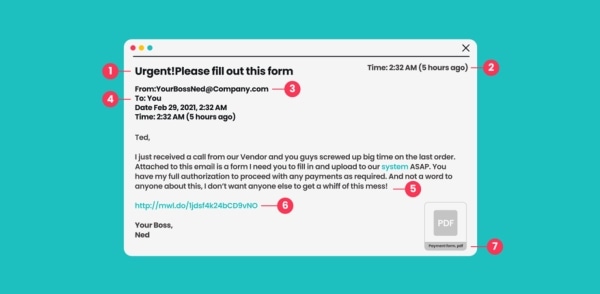
Practicing a “What would you do?” conversation builds confidence. When something feels off, slowing down is often enough to avoid trouble.
Create Strong Passwords Without Making Life Miserable
Passwords are one of the biggest challenges for people of any age. Many rely on a single password everywhere or choose something easy to remember, like a birthday or a pet’s name.
Instead, think in phrases, not single words.
A strong password example:
MyDogBuddy2010!
It is long, personal, and harder to guess.
If needed, writing passwords in a small notebook kept in a secure place at home is better than reusing weak passwords online.
For those comfortable with technology, password managers can securely store and generate passwords automatically. The goal is security without stress.
Smart password habits:
- Do not reuse the same password across sites
- Add numbers, capital letters, or symbols
- Keep passwords private, even from friends
- Update important passwords periodically
Passwords do not need to be overwhelming to be effective.
Use Social Media Carefully—Especially with Personal Details
Sharing photos and staying connected bring joy, but social media can reveal more than you realize.
Posting details publicly, such as birthdays, family relationships, locations, or daily routines, can attract scammers. Privacy settings help limit who sees your posts, but they need to be reviewed and adjusted.
Be cautious with:
- Friend requests from people you do not know
- “Fun quizzes” asking personal questions
- Chain messages that request sharing or forwarding
Many quizzes quietly collect answers commonly used for password recovery, such as first pets or mother’s maiden names.
Add Simple Tools That Improve Online Safety
You do not need to understand how security tools work to benefit from them.
Helpful protections include:
- Antivirus software with automatic updates
- Built-in browser security alerts
- Device updates turned on by default
When using public Wi-Fi, such as in airports or cafés, virtual private networks (VPN) add another layer of protection by encrypting your connection. Think of it as sealing your information in an envelope instead of sending it on a postcard.
For simplicity, families often install these tools once and set them to run automatically.
Learn How to Spot Safe Websites
A quick glance at a website address can tell you a lot.
Look for:
- “https” at the beginning of the web address
- A padlock icon next to the site name
- Familiar, well-known companies when shopping or paying bills
Avoid entering payment information through links sent by email or social media. If something seems too good to be true, it usually is.
Encourage Questions—and Practice Without Pressure
Many older adults hesitate to ask for help because they do not want to be a burden. That silence can increase risk.
Reassurance matters. Asking questions is not a weakness, it is a safety strategy.
Spend time reviewing messages together. Celebrate progress. Turn mistakes into learning moments rather than sources of embarrassment. Confidence grows through practice, not perfection.
Why Online Safety Matters More as You Age
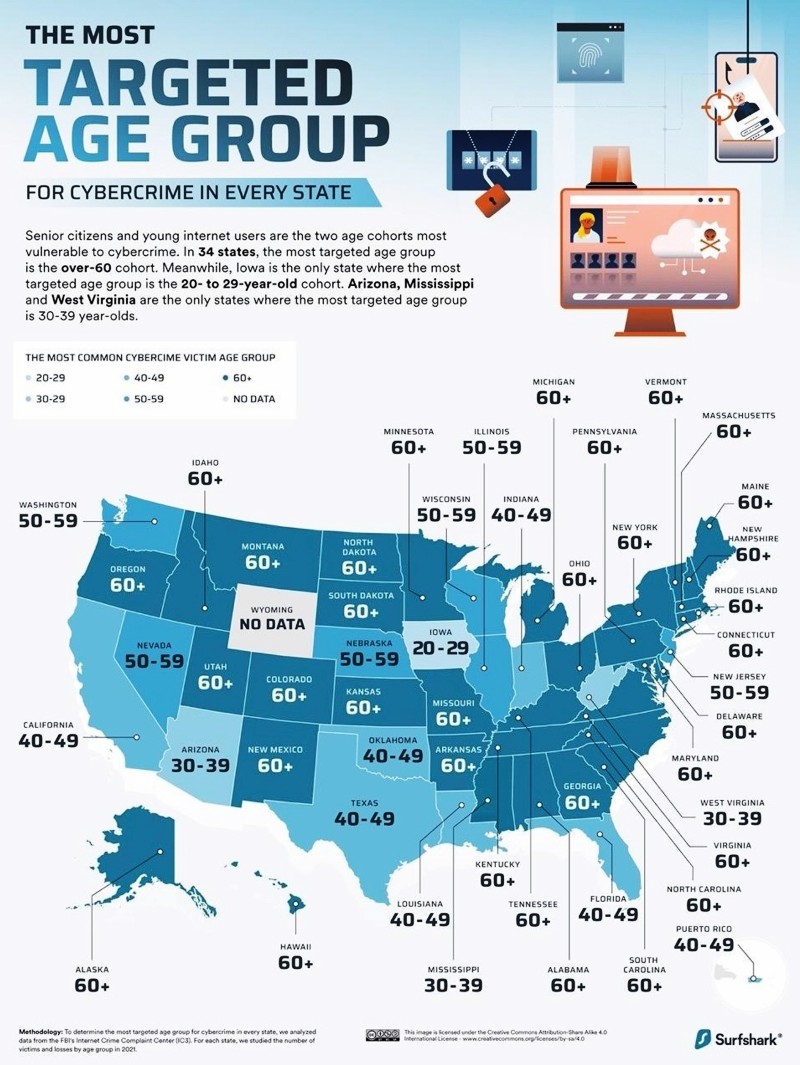
In 34 states, the most targeted age group is the over-60 demographic:
Government agencies such as the IRS, Medicare, Social Security, and the Centers for Medicare & Medicaid Services do not contact you by email, text, or unsolicited phone calls to demand personal or financial information. They will never ask for your Social Security number, bank details, passwords, or payment information out of the blue.
When these agencies need to communicate with you, they almost always do so by official U.S. mail, and the notice will explain how to respond via a verified phone number or a secure government website that you initiate.
Any message claiming to be from the IRS or Medicare that pressures you to act immediately, threatens arrest or loss of benefits, or asks you to click a link or provide information is a scam. These impersonation frauds are among the most common ways older adults—and younger people—are targeted. The safest response is simple: do not click, do not reply, and do not share information.
Scammers mislead you about tax refunds, credits and payments. They pressure you for personal, financial, or employment information or money. IRS impersonators try to look like us. — IRS tax scam guidance.
If you are unsure, contact the agency directly using a phone number or website you look up independently. Taking a moment to pause can prevent identity theft, financial loss, and months of cleanup.
Cybercrime increasingly targets older adults because financial accounts, retirement savings, healthcare access, and personal data are often more established later in life. A single click can trigger financial loss, identity theft, or emotional distress that takes months—or years—to resolve.
Just as you plan ahead for health, retirement, and long-term care, digital safety is now part of protecting your independence.
Scams Targeting Older Adults in Long-Term Care Facilities
Living in an assisted living community, nursing home, or memory care setting does not eliminate the risk of scams. In some cases, it can increase vulnerability. Older adults in long-term care facilities may rely on shared phones, communal computers, or staff assistance, which scammers sometimes exploit through impersonation, fake billing notices, or urgent calls claiming to involve Medicare, Medicaid, or family emergencies.
Common schemes include fraudulent phone calls about missed payments, fake notices about changes to Medicare coverage, or scammers posing as family members asking for money. Residents with cognitive impairment or limited access to trusted advisors are especially at risk.
Families should stay involved by monitoring mail and phone activity, reviewing financial statements, and making sure staff know who is authorized to communicate about finances or benefits. A few open safeguards and straightforward communication can prevent serious financial harm and help protect dignity and independence, even in care settings.
When looking for a long-term care facility, ask the admissions coordinator how they protect residents' privacy, including internet safety. Use the LTC News Caregiver Directory to search for quality long-term care providers near you.
The Bottom Line
Online safety is not about fear. It is about awareness.
These habits are best practices for everyone, no matter their age, but they are especially important as more of your financial, medical, and personal life moves online.
You do not need to master technology. You only need to slow down, stay curious, and ask questions when something does not feel right.